Free Revit add-in
Backup File Organizer
A dead-simple Revit tool that fixes what should’ve been built in.
Every time Revit saves, it leaves a numbered backup file next to your project — and project folders fill up fast. With this add-in installed, each backup Revit creates is automatically moved into a Backups folder in the same directory, so your project folders stay clean.
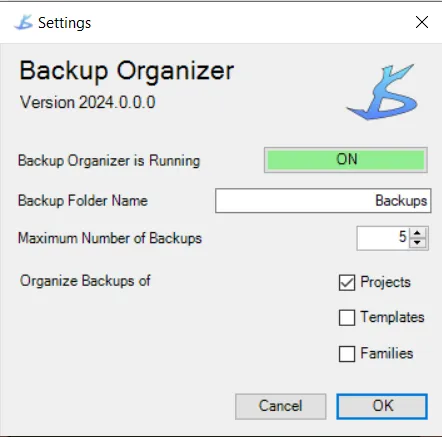
Options
Set it once and forget it. Everything else happens automatically in the background while you work.
-
Keep only what you need
Set the maximum number of backups to keep for each project.
-
Name the folder
Choose what the backup folder is called.
-
Choose what it applies to
Turn it on or off separately for project files, families, and templates.
- Price
- Free
- Listed for
- Revit 2020–2024
- First released
- 2019
Full details, version history, and reviews are on the Autodesk App Store (opens in a new tab).
Need a Revit tool of your own?
We build Revit add-ins that last — dozens deployed across teams over 15+ years in production.